VeivoVerse: AI Video Generator
- 3.6
- Rating
- 10.00K
- Installs
- Free
- Price

 Analysis by App-foxy
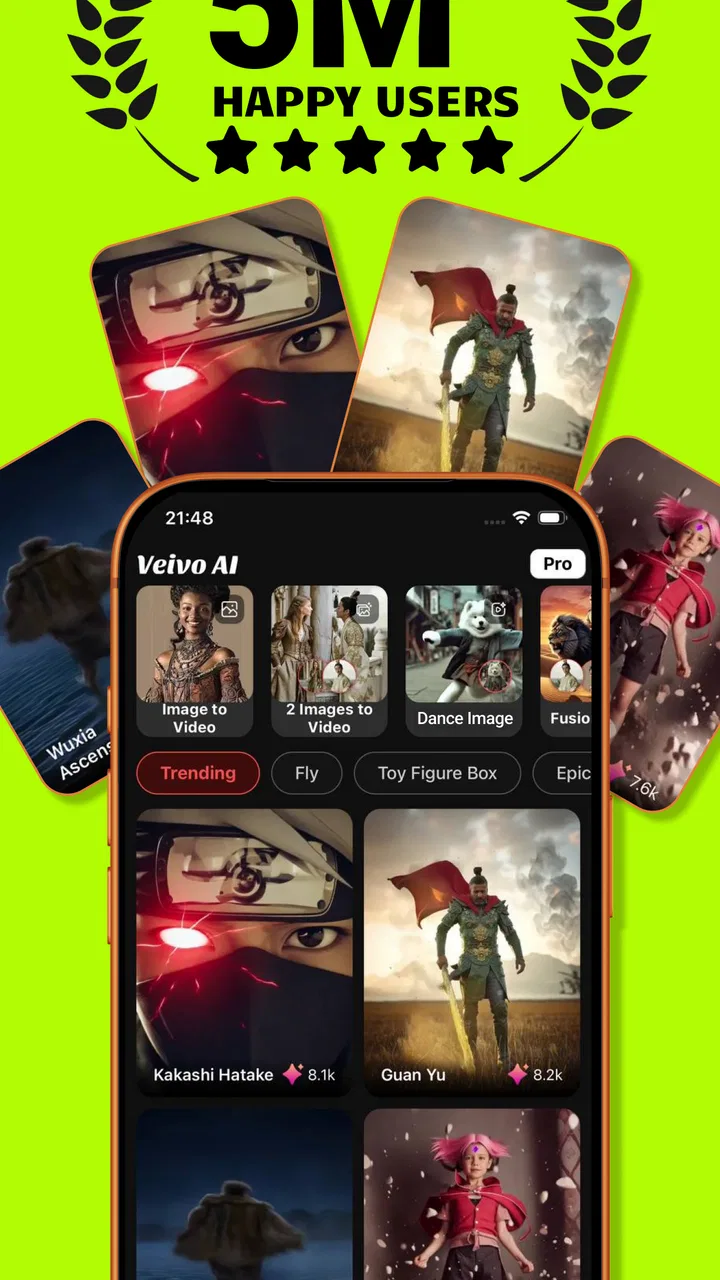
VeivoVerse: AI Video Generator is a free photography app from WeTone that I found most interesting as a quick creative playground rather than a complete replacement for a full video editor. Its central idea is simple: start with a photo and turn it into something more expressive through generated effects. That makes it appealing when I want to give an ordinary image a little movement or atmosphere without opening a complicated desktop-style editing suite.
The app is currently on version 2.4 and is available for devices running Android 7.0 or later. It is listed for everyone, which fits the straightforward creative purpose, although anyone using generated images for children, public posts, or commercial work should still review the result before sharing it. I also noticed that the app is free to install, while optional purchases range from $2.49 to $199.99 for an item, so the real cost depends heavily on how far I want to take the experience.
How VeivoVerse feels in everyday use
My first impression is that VeivoVerse is aimed at reducing the distance between a still photograph and a short, eye-catching visual. Instead of asking me to learn a timeline, keyframes, masks, and detailed export settings, it focuses on effects. That makes the app easier to approach when the goal is experimentation: a profile picture with more personality, a travel image that feels less static, or a social post that needs something beyond a standard filter.
You May Also Like

 AccuWeather: Weather Radar
AccuWeather Review: A Quick, Clear Forecast for Everyday Decisions
For everyday plans, the best forecast is the one you can understand quickly. AccuWeather makes rain timing, radar, and local conditions easy to act on, with a few trade-offs.

 Hill Climb Racing
Why Hill Climb Racing Still Turns Crashes Into One More Run
A tiny car, a bumpy hill and one more upgrade: Hill Climb Racing keeps resurfacing because its simple chaos makes every near-miss feel personal.

 AliExpress - Shopping App
AliExpress Makes Global Shopping Feel Personal, but Shoppers Bear the Risk
AliExpress turns a global marketplace into a pocket-sized discovery engine. Its reach is useful, its shopping loop compelling, and its trade-offs easy to miss.

 Lords Mobile: Kingdom Wars
Lords Mobile Is a Kingdom-Building Routine, Not a Quick Match
A case-by-case verdict on the building, battles, device demands, and social commitments that make Lords Mobile rewarding for some players and exhausting for others.

 PDF Scanner app - TapScanner
TapScanner Makes Paperwork Easier to Capture, Check, and Share
TapScanner makes scanning with a phone feel less like a rescue operation and more like a dependable step in getting work done. Its capture tools are useful, though not flawless.

 Block Blast!
 Shows How Much a Puzzle Game Can Leave Out
A quiet grid game shows why puzzle players increasingly value instant clarity, repeatable skill and low-pressure play—and where the genre still needs to catch up.
More From Our News Desk
View All News


The strongest use case is casual visual creation. I can imagine opening it after taking a photo of a café, a pet, a sunset, or an outfit and testing whether an effect gives the image a more animated mood. It is also useful for someone who regularly posts stories or short updates and wants a quick variation without spending several minutes building a sequence manually.
That convenience comes with an important trade-off. An effects-first app gives me less control than a traditional editor. If I need precise timing, several layers, detailed sound editing, or exact control over every transition, I would rather use a dedicated video editor. VeivoVerse makes more sense when the creative decision is “which treatment suits this image?” rather than “how do I construct a complete video from the ground up?”
A practical workflow for a normal day
A realistic example would be preparing a small announcement for a social account. I might take a clean product photo, import it, test a restrained effect, and compare it with a more dramatic option. The useful discipline here is to keep the original image untouched and treat every generated version as a separate experiment. That way, I can return to the source if an effect changes the subject too much or makes the image harder to understand.
I would also create a small selection before deciding. The first result is not automatically the best one, especially when the image has fine details such as hair, text, thin branches, or patterned clothing. An effect that looks impressive on a landscape may make a face or a logo feel distracting. Comparing variations side by side is a better workflow than judging the first preview in isolation.
My main advice is to use the effect to support the subject, not to hide it. A subtle treatment can make a photo feel more alive while preserving its purpose. A heavy treatment may attract attention to the effect itself, which is fine for playful posts but less suitable for invitations, listings, portfolios, or images where accurate detail matters.
Where the app stands today
VeivoVerse has a relatively focused identity. It is not trying to be a camera replacement, a professional retouching package, or a full production studio in my view. Its appeal comes from the gap between a normal photo and a more dynamic visual result. That focus can be refreshing because I do not have to navigate a large collection of unrelated editing tools before reaching the creative part.
At the same time, the short description attached to the app is simply “VeivoVerse,” while the broader product name identifies it as an AI video generator. That means a new user may need to spend a little time discovering exactly how the photo-effects workflow fits into the overall experience. I would not install it expecting a long tutorial or a fully explained professional process; I would approach it as an app to explore through a few personal images.
The current audience size also suggests a product that is still finding its place. It has passed 10K installs and holds a 3.6 average from around 160 ratings, with 14 written reviews. Those figures do not tell me whether every person will enjoy it, but they do point to a mixed early reception rather than universal approval. I would treat that as a reason to test the free experience carefully before considering optional purchases.
What the version and release details suggest
The app was released on March 8, 2026, and version 2.4 indicates that WeTone has already moved beyond its first public build. That is useful context: the product is not frozen at an initial prototype, but it is also early enough that the interface, effects, and overall workflow may continue to change. I see the current release as a snapshot of an evolving creative tool rather than a finished replacement for established editing software.
For existing users, a move to version 2.4 is most relevant because newer builds can change how familiar workflows feel. Even when the basic purpose remains the same, the location of an effect, the order of creation steps, or the way a result is presented can affect how quickly I get from an idea to a finished image. I would keep original photos saved outside the app and avoid relying on one generated result as the only copy of an important project.
The release information is also a reminder not to confuse product evolution with a guarantee of a particular future feature. I can reasonably expect WeTone to keep refining the experience as the app develops, but I would not choose it today based on features that are not already part of the current version. My recommendation is based on what the app is now: a focused way to experiment with effects for photos.
Three smarter ways to use the effects
One useful approach is to prepare images with a clear subject and a simple background. Effects have less visual competition when the main object is easy to identify, so the result is more likely to feel intentional. A crowded street scene can still be fun, but it is harder to tell whether the transformation improves the photo or merely adds movement to every part of it.
A second approach is to make a copy with extra space around the subject before applying an effect. This gives the composition more breathing room and can make a transformed image easier to crop for different social formats. I would not do this when preserving the exact framing is important, but it is a practical option for casual posts where flexibility matters more than documentary accuracy.
A third approach is to judge the result at normal viewing size, not only zoomed in. When I inspect an effect closely, small irregularities can dominate my attention even though nobody will notice them in a feed. The opposite can also happen: a result that looks exciting in a large preview may become muddy or overly busy after being reduced. Checking both views helps me choose an effect based on how the image will actually be seen.
How it compares with familiar alternatives
Compared with a standard photo editor, VeivoVerse is more about transformation than correction. A conventional editor is usually the better choice for exposure, color balance, cropping, blemish removal, and precise retouching. I would make those basic adjustments first when the original image needs repair, then use VeivoVerse only if an effect adds something worthwhile.
Compared with a full video editor, the attraction is speed and lower complexity. A timeline-based app gives me much finer control over clips, text, audio, and sequencing, but that control also creates more decisions. VeivoVerse is better for a quick visual experiment; the conventional editor wins when I need a polished campaign, a carefully timed presentation, or a video assembled from many sources.
It also differs from a simple filter app. A filter generally changes the overall appearance in a predictable, repeatable way. VeivoVerse is more interesting when I want the image to feel transformed rather than merely recolored. The downside is that a more expressive effect can be less consistent across different photos, so I should expect to test the treatment instead of assuming one setting will work everywhere.
Who will enjoy it, and who should skip it
I think VeivoVerse suits casual creators, social media users, and people who enjoy trying visual ideas without learning a complex editing system. It may also appeal to anyone who has a folder of ordinary photos and wants to rediscover them through a more playful presentation. The free entry point makes experimentation easier, provided I pay attention to optional purchases before committing to a larger workflow.
I would be more cautious if I needed predictable professional output. Photographers delivering client work, businesses that must preserve exact branding, and creators who need detailed control over motion should probably start with a conventional editor. The app may still be useful as an idea generator, but I would not make it the only tool in a workflow where consistency and precision are essential.
People who dislike trial and error may also find it less satisfying. The creative value comes from comparing possibilities, and that naturally takes some patience. If I want one guaranteed correction with no experimentation, a normal adjustment tool is a better match. VeivoVerse is at its best when I am willing to explore rather than simply fix.
Costs, expectations, and everyday caution
The free installation is a clear advantage for trying the basic concept, but the optional purchase range deserves attention. An item priced at $2.49 is very different from one priced at $199.99, so I would check the purchase screen carefully and avoid assuming that every effect or workflow is included at no cost. Anyone letting a child explore the app should be especially careful with purchase controls, even though the content rating is Everyone.
I would also keep expectations realistic around generated results. An effect can make a photo more engaging, but it does not automatically improve composition, storytelling, or clarity. If the source image is blurry, poorly framed, or full of competing details, adding motion may emphasize those weaknesses. The best results usually begin with a photo that already has a clear idea behind it.
For privacy-sensitive work, I would use ordinary caution with personal images and review the app experience before importing anything confidential. Family photos, identification documents, private interiors, and unreleased business material deserve more care than a public landscape or a disposable social post. I would reserve the app for images I am comfortable experimenting with, especially while I am still learning how its creative process handles different subjects.
What I would watch as WeTone continues development
The next stage of VeivoVerse should be judged by how well it balances creative freedom with dependable results. I would watch for improvements that make it easier to understand what an effect will do before committing to it, compare variations without losing the original, and keep the subject recognizable when the treatment becomes more ambitious.
I would also pay attention to how the app handles repeat workflows. A fun experiment is enough for a single photo, but regular users need a comfortable way to work through several images while maintaining a consistent visual style. If WeTone can make that process clearer without turning the app into a complicated editor, it would strengthen the product’s position between simple filters and full video software.
For now, I see the current release as a promising but still specialized photography app. Its best quality is the invitation to look at a familiar photo differently. Its main limitation is that experimentation does not replace control, accuracy, or a complete editing toolkit. I would recommend trying it if you want quick effects and enjoy comparing creative variations, while choosing a traditional editor when the result must be exact.
My final view is positive but measured. VeivoVerse is worth exploring because it gives ordinary photos a different kind of visual life, and the free starting point lowers the risk of finding out whether that style suits me. I would keep the original files, watch the purchase prompts, and judge each result at the size where it will actually be viewed. Used that way, it can be a handy creative side tool rather than an overpromised replacement for every other photography app.
For me, the deciding question is simple: do I want precise editing, or do I want a quick new interpretation of a photo? If the answer is the second one, VeivoVerse deserves a try. If the answer is the first, I would choose a more traditional editor and use this app only when I want an extra burst of experimentation.
FAQs for VeivoVerse: AI Video Generator
01What is VeivoVerse: AI Video Generator?
VeivoVerse: AI Video Generator is an artificial-intelligence app designed to help users create short videos from written prompts, images, or creative ideas. It is aimed at people who want to produce social media clips, visual stories, promotional content, or experimental animations without advanced editing skills. Results can vary depending on the prompt, source material, selected style, and the app’s available generation options.
02How does VeivoVerse create AI-generated videos?
The app generally works by allowing you to describe the scene or concept you want to generate, then selecting available visual styles, formats, or other parameters before starting the creation process. VeivoVerse processes the request through its AI system and produces a video that can usually be previewed and saved. Clear, specific prompts tend to provide more consistent results than short or ambiguous instructions.
03Is VeivoVerse: AI Video Generator free to use?
VeivoVerse may offer free access with limits, such as a restricted number of generations, lower output resolution, watermarks, waiting times, or a limited selection of styles. Some features may require in-app purchases or a subscription, depending on the current version and platform. Before generating extensively, review the app’s pricing page and subscription terms carefully, especially any automatic-renewal conditions.
04Can videos made with VeivoVerse be used commercially?
Commercial usage depends on VeivoVerse’s current terms of service, the type of plan you use, and the content included in your prompt or uploaded media. AI-generated material may still raise copyright, trademark, privacy, or publicity-rights concerns. If you plan to use a video for advertising, client work, or monetized social media, check the app’s licensing rules and make sure you have permission for every image, voice, logo, or character involved.
05What should I know about privacy and uploaded content in VeivoVerse?
Before uploading personal photos, confidential material, or images of other people, read VeivoVerse’s privacy policy and understand how submitted content is stored and processed. AI video services may send prompts and media to remote servers to generate results. Avoid sharing sensitive documents or private information, and obtain consent before using someone else’s likeness. Also check whether uploaded files are retained or used to improve the service.
Pros
- Creates videos from text prompts with minimal editing experience.
- AI-generated visuals can help turn ideas into quick social media content.
- Useful for brainstorming concepts
- scenes
- and short promotional clips.
- Cloud-based workflow makes projects accessible across supported devices.
- Can reduce the time and cost of producing simple video drafts.
Cons
- Output quality may vary significantly depending on the prompt and subject.
- AI scenes can contain visual glitches
- awkward motion
- or inconsistent details.
- Advanced customization may be limited compared with professional video editors.
- Rendering videos can take time and may depend on server availability.
- Some features or exports may require a subscription or usage credits.

VeivoVerse: AI Video Generator
Gallery